


Web App Development Guide for US Businesses, Steps and Costs


A plain-English web app development guide for US business owners. What a web app is, the main types, when to build one, the six stages, what it costs at US and offshore rates, US rules like ADA and HIPAA, and how to start.
A lot of US business owners reach the same point. The spreadsheets are breaking. Staff copy the same data into three tools. Customers email for things they should be able to do online. Someone says "we need a web app," and nobody is sure what that means, what it costs, or where to start.
This guide answers those questions in plain words. It is written for owners and managers of small and mid-sized US companies, not for developers. You will see what a web app is, the main types, the steps to build one, what it costs at US rates and with an offshore team, how long it takes, and when you should not build one at all.
The short answer. Web app development is the work of planning, designing, building, testing and running software that people use in a web browser after they log in. A simple internal tool or portal usually costs $20,000 to $60,000 and takes 2 to 4 months. A customer-facing app with logins, payments and links to your other systems usually costs $60,000 to $200,000 and takes 4 to 8 months. Large platforms with heavy data or strict rules start around $200,000. The safest way to start is a small first version that does one job well.
What a web app is, in plain words
A website mostly shows information. You read it and leave. A web app lets you do things. You log in, enter data, and the app saves it, works with it, and shows you results. Online banking is a web app. So is the portal where you book a doctor visit or track a delivery.
Web apps run in the browser, so nobody has to install anything. They work on a laptop, a tablet and a phone. You update them once on your server, and every user gets the new version the next time they open the page.
| Type | What it does | Example |
|---|---|---|
| Website | Shows pages and takes simple forms | A company homepage with a contact form |
| Web app | Logs people in and lets them work with data | A customer portal for orders and invoices |
| Mobile app | Installed from the App Store or Google Play | A delivery app that uses GPS and push alerts |
| Progressive web app (PWA) | A web app that can be added to a phone home screen and work partly offline | A field service checklist used on job sites |
If all you need is a marketing site that explains your business, read our custom website development guide instead. A web app is a bigger project, and it is worth knowing that before you ask for quotes.
Common types of web apps businesses build
Most business web apps fall into one of five groups. Knowing which one you need makes every later step easier.
- Customer portals. Customers log in to see orders, pay invoices, upload files or book time. These cut down on phone calls and emails.
- Internal tools. Staff use them to run a process, like job scheduling, inventory or approvals. They often replace a tangle of spreadsheets.
- Dashboards and reports. They pull numbers from your other tools into one screen, so managers stop building the same report by hand each week.
- Marketplaces and booking platforms. Two groups of users meet in one app, such as clients and service providers. These are harder because both sides need their own screens.
- SaaS products. Software you sell to other businesses on a monthly plan. These need billing, accounts for many companies, and strong security. Our guide on how to create a SaaS product covers that path in detail.
When a web app makes sense, and when it does not
A custom web app is a real investment. It pays off when the same work happens many times a day and the tools you can buy do not fit.
It usually makes sense when you see signs like these.
- Staff enter the same data into two or three systems.
- A key process lives in spreadsheets that only one person understands.
- Customers call or email to do things they could do themselves online.
- You pay for several software subscriptions and still fill the gaps by hand.
- Your way of working is part of what makes you better than competitors.
It usually does not make sense in these cases.
- A ready-made tool covers 80% or more of what you need. Buy it and adjust your process a little.
- You cannot describe the main job the app should do in two or three sentences.
- Your budget is under about $15,000 and the app needs logins, payments and links to other systems. That budget is better spent on a ready-made tool or a no-code builder for now.
- Nobody on your side has time to answer questions and test the app every week. Projects without an owner on the business side tend to drift.
There is a middle path, too. Many companies keep a ready-made tool for the standard parts, like accounting or email, and build a small web app only for the part that is unique to them.
The web app development process, step by step
Every good team follows roughly the same six stages. The names change from one agency to the next, but the work is the same.
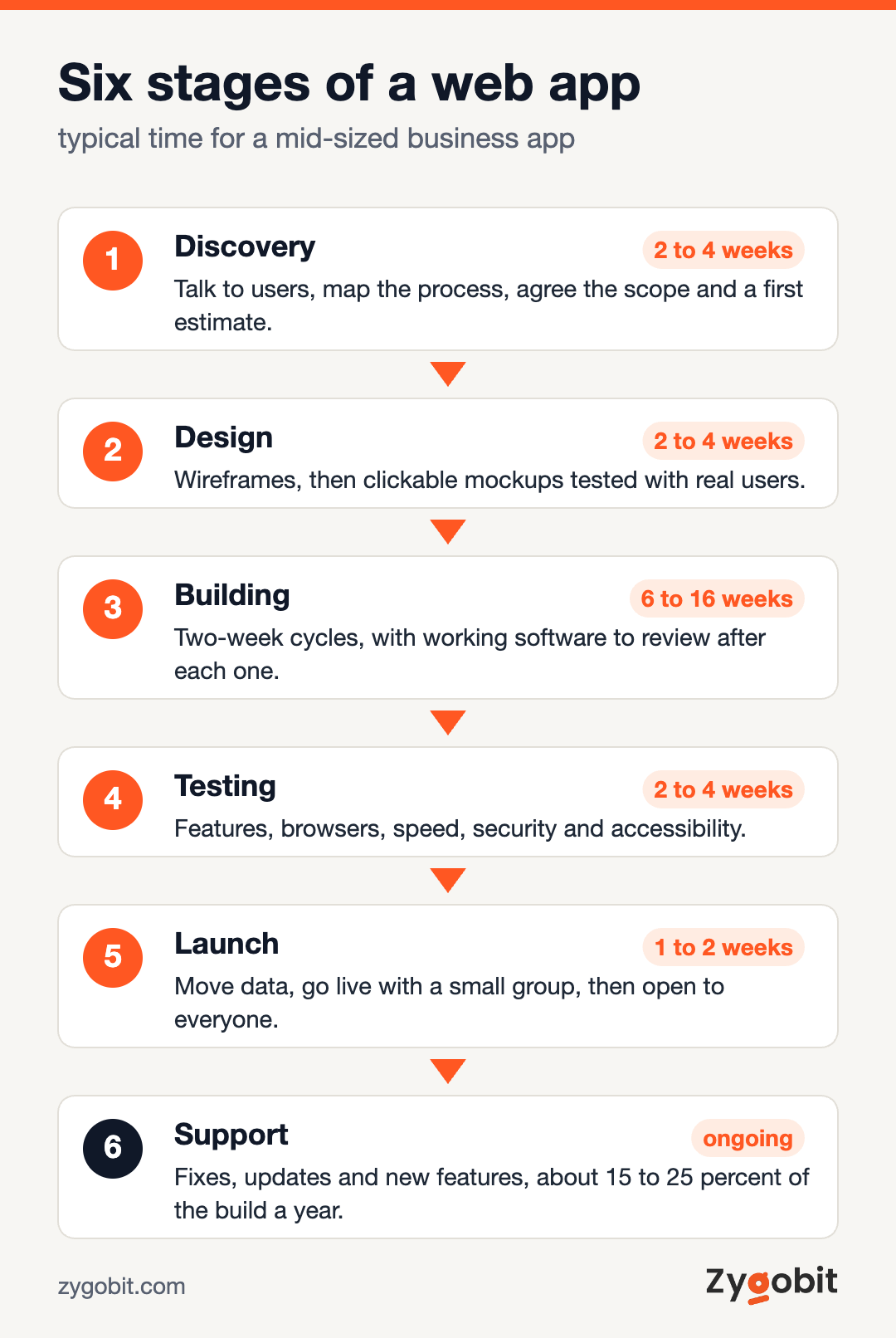
1. Discovery, 2 to 4 weeks
This is where you decide what to build and what to leave out. The team talks to the people who will use the app, maps the current process, and lists the systems it must connect to. The result is a short written scope, a list of features in priority order, and a first estimate. Do not skip this stage to save money. A wrong guess here costs far more later.
2. Design, 2 to 4 weeks
Designers turn the scope into screens. First come simple wireframes that show what goes where. Then come clickable mockups that look like the real app. Put these in front of real users before any code is written. Changing a mockup takes an hour. Changing a finished screen can take a week.
3. Building, 6 to 16 weeks
Developers build the app in short cycles, usually two weeks each. At the end of every cycle you should see working software, not just a status report. The front end is what users see in the browser. The back end stores data, checks who is allowed to do what, and talks to your other systems.
4. Testing, 2 to 4 weeks, plus testing in every cycle
Testers check that every feature works, on different browsers and screen sizes. They also check speed, security and accessibility. Your own staff should test too, using real tasks from a normal day.
5. Launch, 1 to 2 weeks
The app moves to its live servers, old data is moved in, and users get access. Many teams launch to a small group first and widen access once the early problems are fixed.
6. Support and improvements, ongoing
A web app is never really finished. Browsers update, security fixes come out, and users ask for changes. Plan for this from the start. Upkeep usually costs 15 to 25 percent of the build cost each year.
Choosing the technology, without the jargon
You do not need to pick the tools yourself. You do need to know enough to ask good questions. Here is what a typical modern web app is made of.
| Part | What it does | Common choices |
|---|---|---|
| Front end | The screens users see and click | React, Next.js, Angular, Vue |
| Back end | Business rules, logins and data handling | Node.js, Python with Django, PHP with Laravel, .NET |
| Database | Stores your records safely | PostgreSQL, MySQL, MongoDB |
| Hosting | The servers the app runs on | AWS, Microsoft Azure, Google Cloud |
| Links to other tools | Connects to software you already use | APIs for QuickBooks, Salesforce, HubSpot, Stripe and others |
Three questions matter more than the names in that table.
- Is it common? Popular tools are easier to hire for. If your agency picks something rare, you may struggle to find another team later.
- Who owns the code? Your contract should say that you own the code and the accounts it runs on.
- Can it grow? Ask how the app would handle ten times more users. A clear answer is a good sign.
Most business apps today run in the cloud. If you want to know how hosting choices affect cost and speed, our cloud application development guide explains it.
US rules your web app may need to follow
US buyers often learn about these rules late, when they are expensive to add. Raise them in discovery.
- Accessibility. The Americans with Disabilities Act has been used in many lawsuits over websites and apps that people with disabilities cannot use. Most teams build to WCAG 2.1 level AA, the common standard. It covers things like screen reader support, keyboard use and color contrast.
- Health data. If the app stores patient information for a clinic or health plan, HIPAA rules apply. That affects hosting, logging and who can see each record.
- Card payments. If you take card payments, PCI DSS rules apply. The simple fix is to use a payment provider like Stripe so card numbers never touch your own servers.
- Privacy. Several states, including California, have consumer privacy laws. They give people rights to see and delete their data. Your app should make that possible.
This is a general guide, not legal advice. Check the rules for your industry and state with your lawyer.
How much web app development costs
Cost depends on three things more than anything else. How many types of users the app has, how many other systems it must connect to, and where the team is based.
| What you build | Typical cost | Typical time |
|---|---|---|
| Simple internal tool or portal | $20,000 to $60,000 | 2 to 4 months |
| Customer-facing app with logins, payments and integrations | $60,000 to $200,000 | 4 to 8 months |
| Large platform with heavy data or compliance needs | $200,000 and up | 8 months and up |
Where the team sits changes the hourly rate a lot. These are typical rates for experienced developers.
| Team location | Typical hourly rate |
|---|---|
| United States | $100 to $200 or more |
| Eastern Europe | $40 to $80 |
| Latin America | $40 to $80 |
| India | $25 to $50 |
Many US companies mix the two. A product lead in the same time zone runs the project, and an offshore team does most of the building. That can cut the bill a lot, as long as communication is clear and someone on your side reviews the work every week.
Running costs after launch
- Hosting. From about $50 a month for a small internal tool to a few thousand dollars a month for a busy customer app.
- Paid services. Email sending, maps, text messages and payment fees add up as usage grows.
- Upkeep. Plan on 15 to 25 percent of the build cost each year for fixes, updates and small changes.
What pushes the price up
- Many user roles, each with its own screens and permissions
- Links to older systems with no clean way to connect
- Moving years of messy data from old tools
- Strict rules, such as HIPAA, or high security needs
- Changing the scope halfway through the build
If your app will include AI features, like a chat assistant or automatic document reading, those carry their own costs. Our AI agent development cost guide breaks those down by size.
A worked example
This example is made up to show how the numbers fit together. It is not a client project.
A heating and cooling company in Ohio has 25 technicians. Jobs are booked by phone, written on a whiteboard, and typed into QuickBooks at the end of the week. Invoices go out late, and customers call to ask when the technician will arrive.
The company builds a small web app with three parts. Office staff schedule jobs on a shared calendar. Technicians open the job on their phone, add notes and photos, and mark it done. Finished jobs send an invoice to QuickBooks right away, and customers get a text with the arrival window.
That is two user roles, one integration and a text service. It lands in the first row of the cost table. With a blended US and offshore team, a project like this would usually sit between $35,000 and $60,000 and take about 3 to 4 months. Running costs would be a few hundred dollars a month.
How to choose a web app development partner
The team you pick matters more than the tools they use. Ask every company the same questions so you can compare fairly.
- Can you show us two or three web apps like ours, and let us talk to those clients?
- Who exactly will work on our project, and in what time zone?
- How often will we see working software?
- Who owns the code, the design files and the hosting accounts?
- What happens after launch, and what does support cost?
- How do you handle security and accessibility testing?
Be careful with any quote that comes back far lower than the others with no discovery stage. It usually means the hard parts were not counted. If you want a starting list of firms, see our roundup of custom web app development companies.
Mistakes we see most often
- Building everything at once. The first version should do one main job well. Add the rest once real users have tried it.
- No owner on the business side. Someone on your team needs a few hours a week to answer questions and test.
- Skipping design reviews with real users. Staff will tell you in ten minutes what a long spec missed.
- Forgetting data migration. Moving old records is often harder than it looks. Plan time for it.
- No budget for upkeep. An app with no upkeep slowly breaks as browsers and services change.
How to start
You can start this week without spending anything.
- Write down the one job the app must do, in two or three sentences.
- List who will use it, such as staff, customers or partners.
- List the tools it must connect to, such as QuickBooks, a CRM or a payment provider.
- Write down how you will know it worked, such as fewer phone calls or invoices sent the same day.
- Set a budget range and a target launch month.
- Share that one page with two or three development teams and ask for a paid discovery stage, not a fixed price on day one.
If you would like a second opinion on your idea, our web app development team is happy to look at it. We have been building web and mobile software since 2021, with our engineering team in Mohali, India and offices in East Windsor, New Jersey and Putney, New South Wales. If a ready-made tool fits you better, we will say so.
Frequently Asked Questions
What is web application development?
It is the work of planning, designing, building, testing and running software that people use in a web browser. Unlike a normal website, a web app lets users log in, enter data and get things done, such as booking, paying or tracking orders.
How much does it cost to build a web app?
A simple internal tool or portal usually costs $20,000 to $60,000. A customer-facing app with logins, payments and integrations usually costs $60,000 to $200,000. Large platforms with heavy data or strict rules start around $200,000. Plan another 15 to 25 percent of the build cost each year for upkeep.
How long does it take to build a web app?
A simple app takes about 2 to 4 months from discovery to launch. A customer-facing app with several integrations takes about 4 to 8 months. Larger platforms take 8 months or more and are best built in phases.
What is the difference between a web app and a website?
A website mostly shows information, like your services and contact details. A web app lets people do things, like log in, manage records, pay or book. Many companies have both, a website for marketing and a web app for customers or staff.
Should I build a web app or a mobile app?
Start with a web app if people mostly use it at a desk, or if you want one version that works on every device. Choose a mobile app if you need the camera, GPS, push alerts or offline use every day. A progressive web app can cover some of both.
What is the best technology for web app development?
There is no single best choice. Common, well-supported tools are the safe pick, such as React or Next.js for screens, Node.js or Python for the back end, and PostgreSQL for data. What matters most is that the tools are popular enough to hire for and that you own the code.
Can I build a web app without a developer?
For simple internal tools, yes. No-code builders can handle forms, lists and basic workflows. Once you need custom logic, links to several systems, strong security or many users, a development team is usually the better choice.

Ready to build the site your business actually needs?
Talk to Zygobit about custom website and web application development, from discovery through launch and the months after.
Explore Related Articles
More reading on web, mobile, AI, and product engineering from the Zygobit team.

Top 20 Node.js Web Development Companies for US Businesses (2026)
A plain-English comparison of 20 Node.js web development companies for US businesses. Years in business, team size and US offices from each company's own site, typical rates and project costs, when Node.js fits, and how to choose a partner.

What Custom Website Development Is, What It Costs and When It Is Worth It
Custom website development means a site designed and coded around your business instead of a template. This guide explains what that involves, what a custom (or bespoke) website costs in 2026 by type of site, how the process runs week by week, when a template is the better choice, and what to get in writing before you hire a developer.

AI Agents Examples by Department, 26 Real Uses and What They Cost
26 plain-English AI agents examples for customer service, sales, marketing, finance, HR, operations and IT. For each one you see what it does, which tools it plugs into, what a person still checks, and what a first agent costs to run.